


New article
Recently updated
Troubleshooting Reports Error: Unexpected error occurred: For input string: ""

Who is this article for?Users who generate reports.
Reports_Createpermissions are required.
When generating reports, you may experience the following error: Unexpected error occurred: For input string: ""

This error will prevent the report from being able to generate, and this article will provide an overview of why this error message has occurred and what troubleshooting are needed to rectify the problem.
Why has this error message occurred?
If you have row sorting configured on your report layout, unfortunately the system is not designed to sort against multiple blank values. So, when you generate the report where a blank value exists in an item being pulled for that report, this error message can occur. For example:
Here we have set up a simple report layout and can see that we have 'row sorting' set up against a custom field 'I am a custom field'.
Note: You can select the test "Rows are sorted by I am a Custom Field Code" to access the 'row sorting' settings, however, if you untick the 'Display' box in the 'Sorting Summary' this will hide the text on the page. Instead, to access these settings again you would need to select the 'set up..' option and select 'row sorting' from the dropdown list: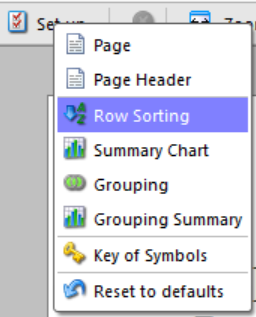
In the example report that uses this Report Layout, we have asked the system to pull data from the following PIs:
Where PIs "001 Example PI" and "002 Example PI" have a value against custom field "I am a Custom Field":
But "000 Example PI" and "003 Example PI" does not:
So, when the report is generated the following error message occurs:
Unexpected error occurred: For input string: ""
What can I do to rectify this error?
If you find yourself coming across this error when generating a report, there are two things you can do to rectify this:
| Solution | Recommendation |
|---|---|
|
Remove the row sorting set-up option from the report layout. More information about row sorting can be found here: Row Sorting From above Example: In the report Layout settings we can locate the row sorting option where blank values exist against and select "remove":
|
This option is normally recommended it is not guarantee that this custom field will have data against it before a report is generated. |
|
Ensure there are no blank values in the items being pulled for a report, when row sorting has been configured for that field. From above Example: By inputted a value against the "I am a custom Field" field, for PIs "000 Example PI" and "003 Example PI" the report will then be able to generate. |
This option is ideal, as you are then able to use the row sorting function as intended. Note: If you are concerned about not being able to guarantee that a custom field will have data against it before the report is generated, then you can make a request to our support team to find out if you are able to make that field mandatory. |
After actioning one of these solutions, you should find that the report is then able to generate, however, if neither of these steps rectify the problem for, please contact our support team for further assistance.